
Waybar (Hyprland)
 Waybar - панелька (статус бар), которую вы наблюдаете сверху своего рабочего стола. На ней можно разместить информацию о системе, какие-то кнопки для управления системой и прочее. Все блоки, устанавливаемые на waybar называются модулями. Модули вы можете создавать, указывая путь к скрипту, тогда waybar выполнит этот скрипт при запуске, а trayтак же waybar сможет отобразить то, что этот скрипт выводит. Так же существуют встроенные модули, которые будут работать из коробки, а те, что из котобки не запустятся, можно поредачить и запустить.
При настройке используются 2 файла:
- config.json, в котором настраиваются модули, их расположение на панели.
- styles.css в котором настраивается внедший вид модулей.
Для установки необходимо выполнить команду в эмуляторе терминала:
sudo pacman -Sy waybar
Файл config.json хранится в каталоге ~/.config/waybar/config.json
Мой конфиг выглядит так:
// -*- mode: jsonc -*-
{
"swap-icon-label": true,
// "layer": "top", // Waybar at top layer
// "position": "bottom", // Waybar position (top|bottom|left|right)
"height": 32, // Waybar height (to be removed for auto height)
// "width": 1280, // Waybar width
"spacing": 0, // Gaps between modules (4px)
// Choose the order of the modules
"margin-top": 4,
"margin-left": 4,
"margin-right": 4,
"modules-left": [
"custom/power",
"hyprland/workspaces",
"custom/media",
"hyprland/window"
],
"modules-center": [
"custom/filesystem",
"cpu",
"memory",
"temperature"
],
"modules-right": [
"custom/weather",
"custom/updates",
"backlight",
"pulseaudio",
"battery",
"tray",
"hyprland/language",
"custom/clock"
],
// Modules configuration
"hyprland/workspaces": {
"disable-scroll": true,
"all-outputs": true,
"warp-on-scroll": false,
"format": "{name}: {icon}",
"format-icons": {
"1": " ",
"2": " ",
"3": " ",
"4": " ",
"5": " ",
"urgent": " ",
"active": " ",
"default": " "
}
},
"hyprland/window": {
"max-length": 20 // Characters count
},
"tray": {
"icon-size": 21,
"spacing": 10
},
"cpu": {
"format": "{usage}% ",
"tooltip": false
},
"memory": {
"format": "{}% "
},
"temperature": {
// "thermal-zone": 2,
// "hwmon-path": "/sys/class/hwmon/hwmon2/temp1_input",
"critical-threshold": 80,
"format-critical": "{temperatureC}°C {icon}",
"format": "{temperatureC}°C {icon}",
"format-icons": ["", "", ""]
},
"backlight": {
// "device": "acpi_video1",
"format": "{percent}% {icon}",
"format-icons": ["",""]
},
"hyprland/language": {
"format": "{}",
"format-en": "EN",
"format-ru": "RU",
"keyboard-name": "at-translated-set-2-keyboard"
},
"battery": {
"states": {
// "good": 95,
"warning": 30,
"critical": 15
},
"format": "{capacity}% {icon}",
"format-full": "{capacity}% {icon}",
"format-charging": "{capacity}% ",
"format-plugged": "{capacity}% ",
"format-alt": "{time} {icon}",
// "format-good": "", // An empty format will hide the module
// "format-full": "",
"format-icons": [""]
},
"pulseaudio": {
// "scroll-step": 1, // %, can be a float
"format": "{volume}% {icon} {format_source}",
"format-bluetooth": "{volume}% {icon} {format_source}",
"format-bluetooth-muted": " {icon} {format_source}",
"format-muted": " {format_source}",
"format-source": "{volume}% ",
"format-source-muted": "",
"format-icons": {
"headphone": " ",
"hands-free": " ",
"headset": " ",
"phone": "",
"portable": "",
"car": "",
"default": [" ", " ", " "]
},
"on-click": "pavucontrol"
},
"wireplumber": {
"format": "{volume}% ",
"format-muted": "",
"on-click": "helvum"
},
"custom/media": {
"format": "{0} {1}",
"return-type": "json",
"max-length": 20,
"format-icons": {
"spotify": "",
"default": ""
},
"escape": true,
"exec": "$HOME/.config/waybar/mediaplayer.py 2> /dev/null" // Script in resources folder
// "exec": "$HOME/.config/waybar/mediaplayer.py --player spotify 2> /dev/null" // Filter player based on name
},
"custom/power": {
"format" : " ⏻ ",
"on-click": "/home/tehop/.config/rofi/powermenu/type-3/powermenu.sh"
},
"custom/weather": {
"format" : "{}",
"exec" : "/home/tehop/.scripts/yaweather/venv/bin/python /home/tehop/.scripts/yaweather/weather.py",
"interval" : 1200
},
"custom/updates": {
"format" : "{} ",
"exec" : "/home/tehop/.scripts/updateinfo.sh",
"interval" : 1800,
"on-click": "/home/tehop/.scripts/updatestart.sh"
},
"custom/filesystem": {
"format" : " {} ",
"exec" : "/home/tehop/.scripts/filesystem.sh",
"interval": 1200
},
"custom/clock": {
"format" : " {} ",
"exec" : "date | cut -c21-25",
"interval": 60,
"on-click": "alacritty --title 'calcurse' -e calcurse" // устанавливаю заголовок (title) при запуске для того, чтобы настроить правила окон.
// при нажатии на часы, календарь появляется не в центре экрана, а под часами в плавающем режиме
}
}
Таблица со стилями лежит в этом же каталоге ~/.config/waybar/style.css
Моя таблица стилей выглядит так:
* {
    font-family: JetBrainsMonoNerd Font, Font Awesome, sans-serif;
    font-size: 17px;
    min-height: 0;
}

language#waybar {
    background: rgba(46, 52, 64, 0.1); /* Nord0 */
    border-radius: 10px;
    color: #D8DEE9; /* Nord4 */
}

window#waybar {
    background: rgba(46, 52, 64, 0.9); /* Nord0 */
    border-radius: 10px;
    color: #D8DEE9; /* Nord4 */
}

/* Общий стиль блоков */
#workspaces button,
#clock,
#language,
#battery,
#cpu,
#memory,
#pulseaudio,
#network,
#temperature,
#tray,
#window,
#custom-* {
    background: #3B4252; /* Nord1 */
    color: #D8DEE9;
    border-radius: 8px;
    padding: 2px 8px;
    margin: 2px;
}

/* Общий стиль блоков после наведения */
#workspaces button:hover,
#pulseaudio:hover,
#tray:hover,
#battery:hover,
#custom-*:hover {
    transition: all 0.2s ease;
	color: rgba(46, 52, 64, 0.9);
    background-color: #a3be8c;
}

/* Рабочие пространства */
#workspaces button.active {
    background-color: #81A1C1; /* Nord9 */
    color: #ECEFF4;
}
#workspaces button.urgent {
    background-color: #BF616A; /* Nord11 */
}

/* Нагрузка процессора */
#cpu {
    padding: 2px 10px 2px 8px;
}

/* Ресурсы оперативной памяти */
#memory {
    padding: 2px 13px 2px 8px;
}

/* Батарея */
#battery.charging {
    background-color: #A3BE8C; /* Nord14 */
    color: #2E3440;
}
#battery.critical:not(.charging) {
    background-color: #BF616A;
    color: #ECEFF4;
}

/* Подсветка экрана */
#backlight {
    background: #3B4252; /* Nord1 */
    border-radius: 8px;
    padding:2px 8px 2px 8px;
    margin: 2px;
    color: #ECEFF4;
}

/* Звук */
#pulseaudio.muted {
    background-color: #434C5E; /* Nord2 */
    color: #D8DEE9;
}

/* Температура */
#temperature.critical {
    background-color: #BF616A;
    color: #ECEFF4;
}

/* Кастомные модули */
#custom-media {
    background-color: #ECEFF4;
    color: #3B4252;
    border-radius: 8px;
    padding: 2px 8px;
    margin: 2px;
}
#custom-power {
    background-color: #ECEFF4;
    color: #3B4252;
    border-radius: 8px;
    padding: 2px 12px 2px 8px;
    margin: 2px;
}
#custom-updates {
    background: #3B4252; /* Nord1 */
    border-radius: 8px;
    padding:2px 13px 2px 8px;
    margin: 2px;
    color: #ECEFF4;
}
#custom-filesystem {
    background: #3B4252;
    border-radius: 8px;
    padding: 2px 8px 2px 3px;
    margin: 2px;
    color: #ECEFF4;
}
#custom-weather {
    background: #3B4252; /* Nord1 */
    border-radius: 8px;
    padding: 2px 18px 2px 8px;
    margin: 2px;
    color: #ECEFF4;
}
#custom-clock {
    background: #3B4252; /* Nord1 */
    border-radius: 8px;
    margin: 2px;
    color: #ECEFF4;
    font-size: 22px;
}

/* Наведение своих модулей при наведении */
#custom-power:hover,
#custom-updates:hover,
#custom-clock:hover {
    transition: all 0.2s ease;
    color: rgba(46, 52, 64, 0.9);
    background-color: #a3be8c;
}
Изменение цвета при наведении я изменил только у тех модулей, которые при клике мышкой вызывают какую-то команду. Статичные модули не меняют цвет.
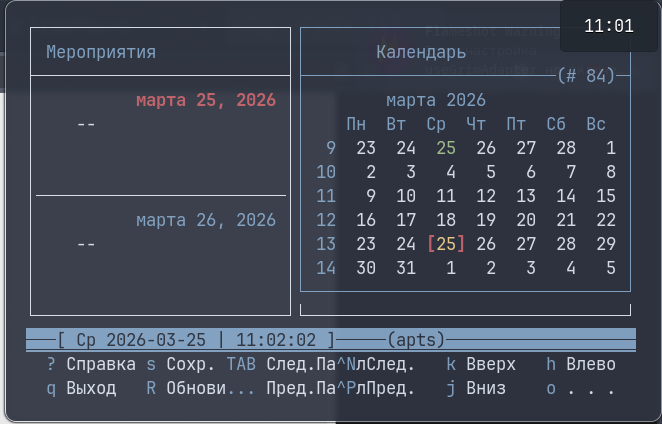
При нажатии на модуль часов открывается сторонний консольный календарь, установить который можно из репозитрия командой:
sudo pacman -Sy calcurse
Цвета можно поменять внутри утилиты, снизу кнопки настроек.
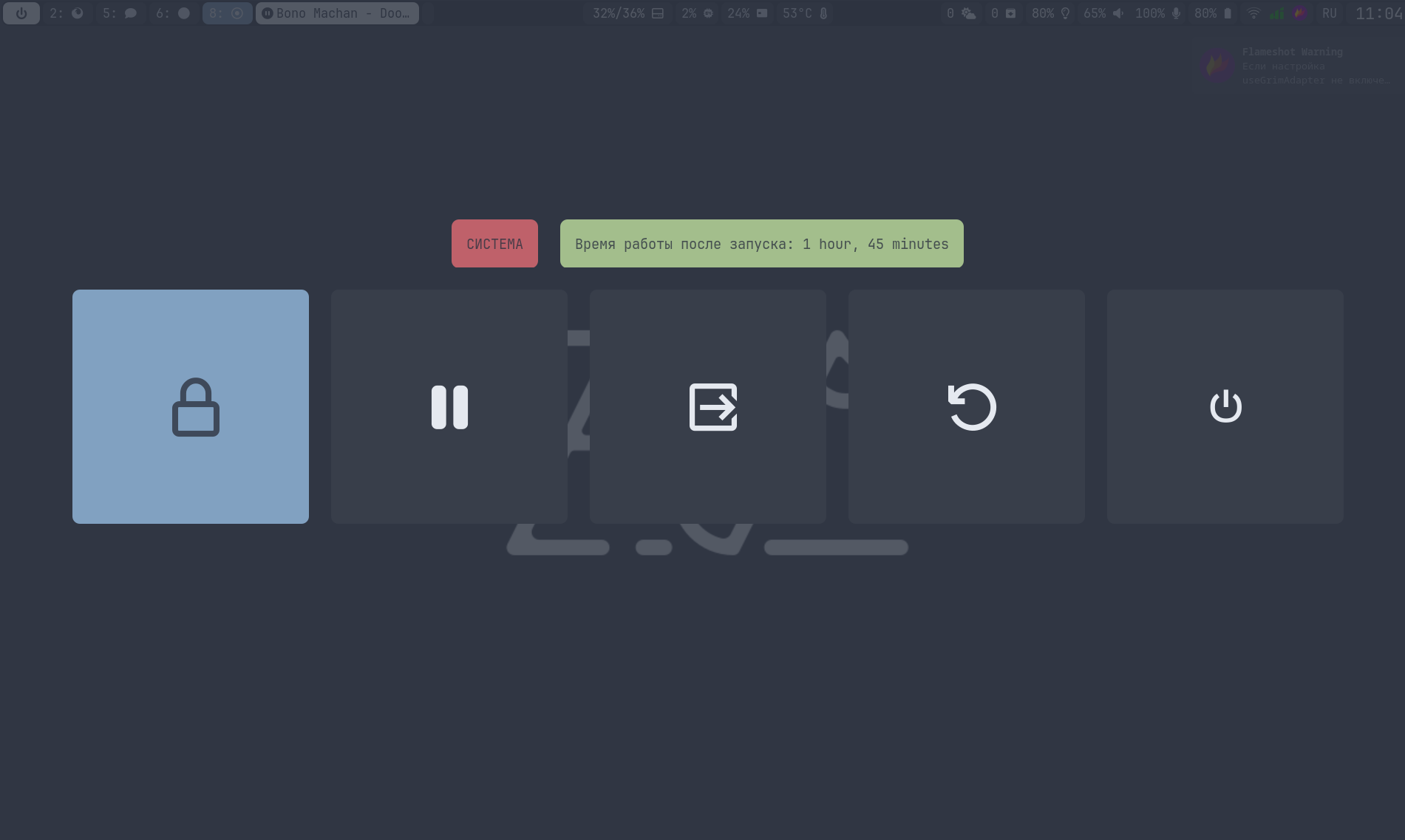
При нажатии на кнопку питания открывается меню управления питанием (перезагрузка, выключение, сон и прочее).
Скрипт, отображающий использованное пространство, наличие обновлений, модуль медиаплеера и погоду, можно посмотреть в разделе со скриптами.
Сами конфиги (в том числе и настройки powermenu) можно найти во вкладке с готовыми конфигами.